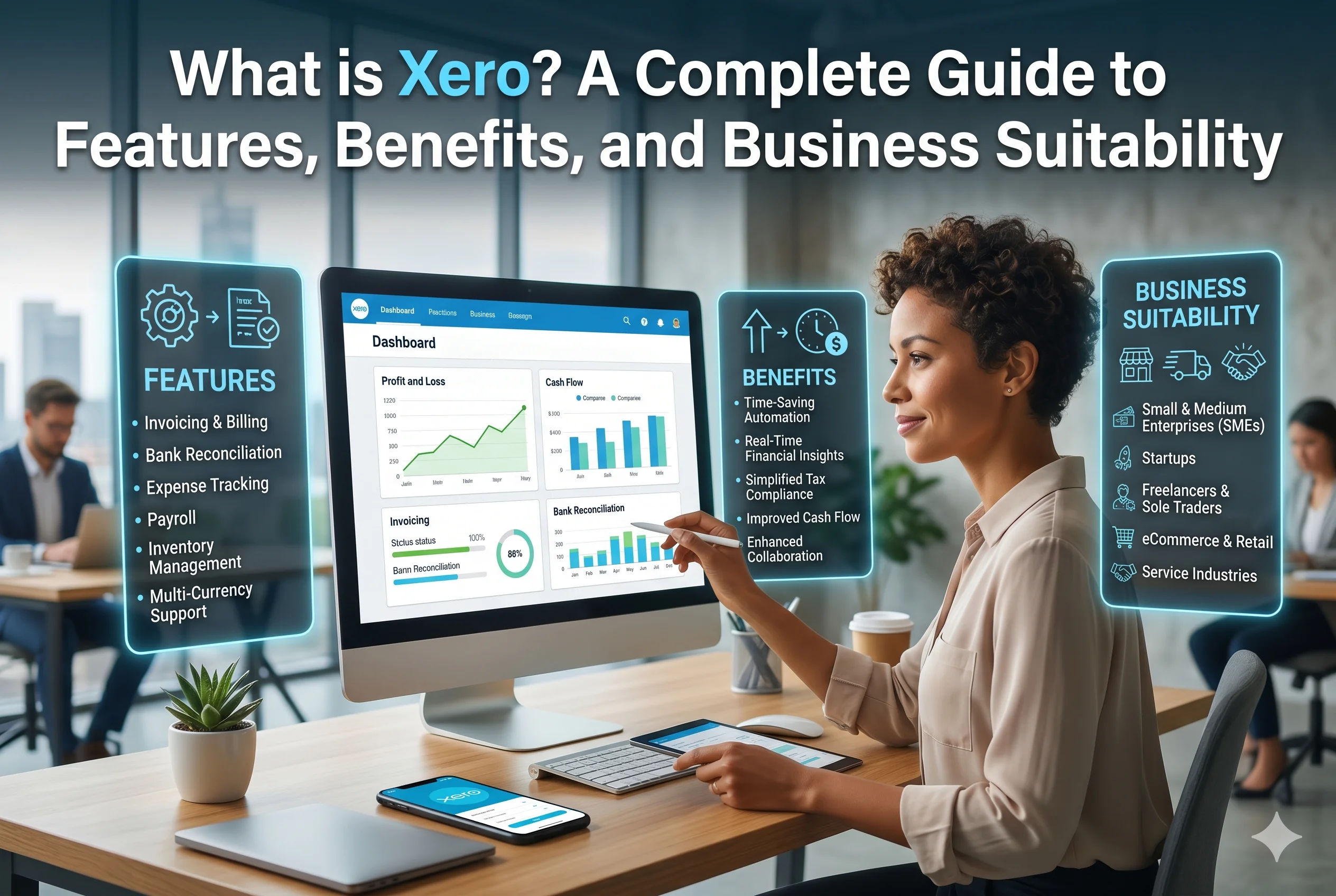
What is Xero? A Complete Guide to Features, Benefits, and Business Suitability
Introduction
In today’s digital business environment, managing finances manually is no longer practical for most companies. Businesses need fast, accurate, and automated accounting solutions that reduce human error and save time. One of the most popular cloud-based accounting platforms is Xero.
Xero is widely used by small and medium-sized businesses around the world to handle accounting, bookkeeping, invoicing, payroll, and financial reporting—all in one place. This article explains what Xero is, its key features, benefits, and whether it is the right choice for your business.
What is Xero?
Xero is a cloud-based accounting software designed to help businesses manage their financial operations online. It was built to replace traditional desktop accounting systems with a modern, accessible, and automated platform.
Unlike traditional software installed on a computer, Xero runs entirely in the cloud. This means users can access their financial data anytime, anywhere, using just an internet connection.
At its core, Xero helps businesses:
- Track income and expenses
- Send invoices and receive payments
- Reconcile bank transactions automatically
- Manage payroll (in supported regions)
- Generate financial reports
- Collaborate with accountants in real time
Key Features of Xero
Xero offers a wide range of features that simplify business accounting and financial management.
1. Online Invoicing
Xero allows businesses to create and send professional invoices quickly. You can:
- Customize invoice templates
- Add logo and branding
- Send invoices via email
- Track invoice status (paid, unpaid, overdue)
- Set up automatic payment reminders
This improves cash flow and reduces late payments.
2. Bank Reconciliation
One of Xero’s strongest features is automatic bank reconciliation.
- Connect your bank account securely
- Import transactions automatically
- Match transactions with invoices or bills
- Reconcile accounts in real time
This reduces manual bookkeeping and improves accuracy.
3. Expense Tracking
With Xero, businesses can easily track expenses by:
- Uploading receipts
- Categorizing expenses
- Linking expenses to projects or clients
- Monitoring spending trends
This helps in better budgeting and cost control.
4. Payroll Management
In regions where payroll is supported, Xero provides:
- Employee salary processing
- Tax calculations
- Payslip generation
- Leave tracking
- Direct bank payments
This simplifies HR and payroll operations.
5. Financial Reporting
Xero provides powerful reporting tools such as:
- Profit & Loss statements
- Balance sheets
- Cash flow reports
- Tax summaries
- Custom financial reports
These reports help business owners make data-driven decisions.
6. Inventory Management
For product-based businesses, Xero allows:
- Tracking stock levels
- Managing product pricing
- Monitoring inventory movement
- Avoiding overstock or shortages
7. Multi-User Collaboration
You can invite accountants, employees, or partners to your Xero account with controlled permissions. This improves teamwork and transparency.
8. App Integrations
Xero integrates with hundreds of third-party apps, including:
- Payment gateways
- CRM systems
- E-commerce platforms
- Inventory tools
This makes it highly flexible for different business models.
Benefits of Using Xero
Using Xero provides several advantages for businesses of all sizes.
1. Time Saving
Automation reduces manual data entry, invoicing, and reconciliation, saving hours of work every week.
2. Accuracy and Reduced Errors
Since transactions are automatically imported and matched, human errors in accounting are significantly reduced.
3. Real-Time Financial View
Business owners can see updated financial data anytime, which helps in quick decision-making.
4. Better Cash Flow Management
With automated invoicing and reminders, businesses get paid faster and manage cash flow more effectively.
5. Remote Accessibility
As a cloud-based platform, Xero can be accessed from:
- Laptop
- Tablet
- Smartphone
This is especially useful for remote teams and business owners on the move.
6. Easy Collaboration with Accountants
Accountants can access real-time data, reducing delays in tax filing and financial reporting.
7. Scalability
Xero grows with your business. Whether you’re a startup or a growing company, it can handle increasing transactions and users.
Why Xero is a Good Choice
Xero is considered a strong choice because it combines simplicity with powerful features.
Here’s why it stands out:
- User-friendly interface suitable for non-accountants
- Fully cloud-based with secure data storage
- Strong automation features
- Large ecosystem of integrations
- Suitable for multiple industries
- Continuous updates and improvements
Unlike traditional accounting tools, Xero focuses on making accounting easy, even for users without financial backgrounds.
Is Xero Suitable for Your Business?
The suitability of Xero depends on the size and nature of your business.
Xero is ideal if you:
- Want cloud-based accounting
- Need automated invoicing and bank reconciliation
- Run a small or medium-sized business
- Work with an accountant remotely
- Want real-time financial reporting
- Use multiple business apps
Xero may NOT be ideal if you:
- Have extremely complex enterprise-level accounting needs
- Require highly customized legacy accounting systems
- Operate in regions where payroll support is limited
Business Types That Should Use Xero
Xero is suitable for a wide range of industries.
1. Small Businesses
Retail shops, service providers, and local businesses benefit from easy invoicing and expense tracking.
2. Freelancers and Self-Employed Professionals
Freelancers can track income, send invoices, and manage taxes easily.
3. E-commerce Businesses
Online sellers can integrate Xero with platforms like Shopify or WooCommerce to manage sales and inventory.
4. Startups
Startups benefit from its low cost, scalability, and automation features.
5. Accounting Firms
Accountants use Xero to manage multiple client accounts efficiently.
6. Service-Based Businesses
Agencies, consultants, and IT service providers use Xero for billing clients and tracking project expenses.
7. Growing SMEs
Medium-sized businesses use Xero for advanced reporting and financial control as they scale.
Conclusion
Xero is a powerful cloud-based accounting solution designed to simplify financial management for businesses of all sizes. With features like invoicing, bank reconciliation, payroll, reporting, and integrations, it helps businesses save time, reduce errors, and improve financial decision-making.
It is especially suitable for small to medium-sized businesses, freelancers, startups, and service-based companies looking for an easy-to-use yet powerful accounting system.
If your goal is to modernize your accounting process and move away from manual spreadsheets or traditional desktop software, Xero is one of the strongest options available today.
Xero’s honest strengths and limitations
Strength: Bank reconciliation is excellent. Saves hours weekly.
Strength: Interface is intuitive. Non-accountants learn fast.
Limitation: Payroll support varies by region. Check yours.
Limitation: Costs add up. $29-$75/mo plus app subscriptions.
Strength: Bank feeds update daily with minimal effort.
Most transactions match automatically once rules are set.
Strength: Unlimited users included on every plan.
Your accountant and team collaborate without extra seats.
Limitation: Advanced inventory needs a third-party app.
Businesses with warehouses often pair Xero with DEAR.
Limitation: Phone support is limited; help is mostly online.
Response times vary, so plan around self-service help.
Strength: 1,000+ app integrations extend what Xero can do.
Limitation: Pricing rises as you add payroll and apps.
Scenario: a 10-person marketing agency. Xero shines — invoicing, payroll, and reports in one place.
Trade-off: that same agency outgrows Xero’s inventory the day it starts selling merch.
Inventory depth is the honest weak spot. Xero tracks quantities and values, not batches or bins.
If you need serial numbers or multi-location stock, budget for an inventory app from day one.
Payroll geography matters. Xero payroll is strongest in the UK, Australia, and New Zealand.
In the US, Xero leans on Gusto; elsewhere, you may run payroll entirely outside Xero.
Learning curve: a spreadsheet user is productive in a week; a first-timer needs a month.
The chart of accounts confuses beginners most — have an accountant set it up once, properly.
Scenario: a freelance designer with 20 invoices a month. Xero is overkill but still worth it.
At that volume, bank feeds plus simple invoicing beats spreadsheet chaos for the price of lunch.
Who Xero is best for — and who should look elsewhere
Best for: Freelancers, SMBs, and firms needing cloud accounting.
Best for: Businesses with an accountant who uses Xero.
Look elsewhere: Enterprises needing complex inventory or payroll.
Look elsewhere: If you need desktop software or one-time purchase.
Best for: Service businesses billing by the hour.
Time tracking plus invoicing keeps projects profitable.
Best for: E-commerce sellers syncing Shopify or Amazon.
Sales flow in automatically; reconciliation stays quick.
Best for: Startups wanting clean books from day one.
Simple setup means founders manage alone at first.
Look elsewhere: Manufacturers needing deep job costing.
Specialized ERP tools handle complex production better.
Look elsewhere: Businesses wanting a one-time license.
Xero is subscription-only; desktop buyers should pass.
Pick QuickBooks if your accountant lives in it — fighting their workflow costs more than the fee.
Pick a free tool like Wave if you send under five invoices a month and have no staff.
Pick an ERP like NetSuite for multiple entities needing consolidated reporting.
Construction firms with progress billing and retentions often need specialist software too.
Restaurants with heavy POS and tip workflows usually pair Xero with a hospitality app.
Nonprofits needing fund accounting should try Aplos before forcing Xero to fit.
If your country lacks Xero payroll and local tax support, the ‘global’ promise wears thin.
Honest test: list three must-have features. If Xero needs paid apps for two, compare totals.
The best tool is the one your team actually uses — a perfect pick nobody opens is worthless.
Revisit the choice yearly; the right answer at 5 staff may change at 50.
FAQs
Q: Is Xero good for beginners? A: Yes. Interface is user-friendly.
Q: Xero vs QuickBooks? A: Both solid. Xero wins on interface.
Q: Does Xero work offline? A: No. It requires internet.
Q: Can I try Xero free? A: Yes. 30-day free trial available.
Q: Xero cost? A: Starter $29/mo, Standard $50/mo, Premium $75/mo.
Q: Is Xero better than spreadsheets?
A: Yes, once volume grows. Automation beats manual entry.
A: Spreadsheets still work for very simple side gigs.
Q: Can I switch from QuickBooks to Xero?
A: Yes. Import tools move your data across.
A: Run both systems briefly to verify balances.
Q: Does Xero include payroll?
A: In supported regions, yes, on higher plans.
A: Otherwise, connect a payroll app like Gusto.
Q: Is there a contract? A: No. Xero bills month to month.